Skip to content
    ego (lite) is just a browser, ego is your personal agent across devices.Join waitlist
    Pricing
    Use cases/ IT teams

    Is it us, or a service we depend on?

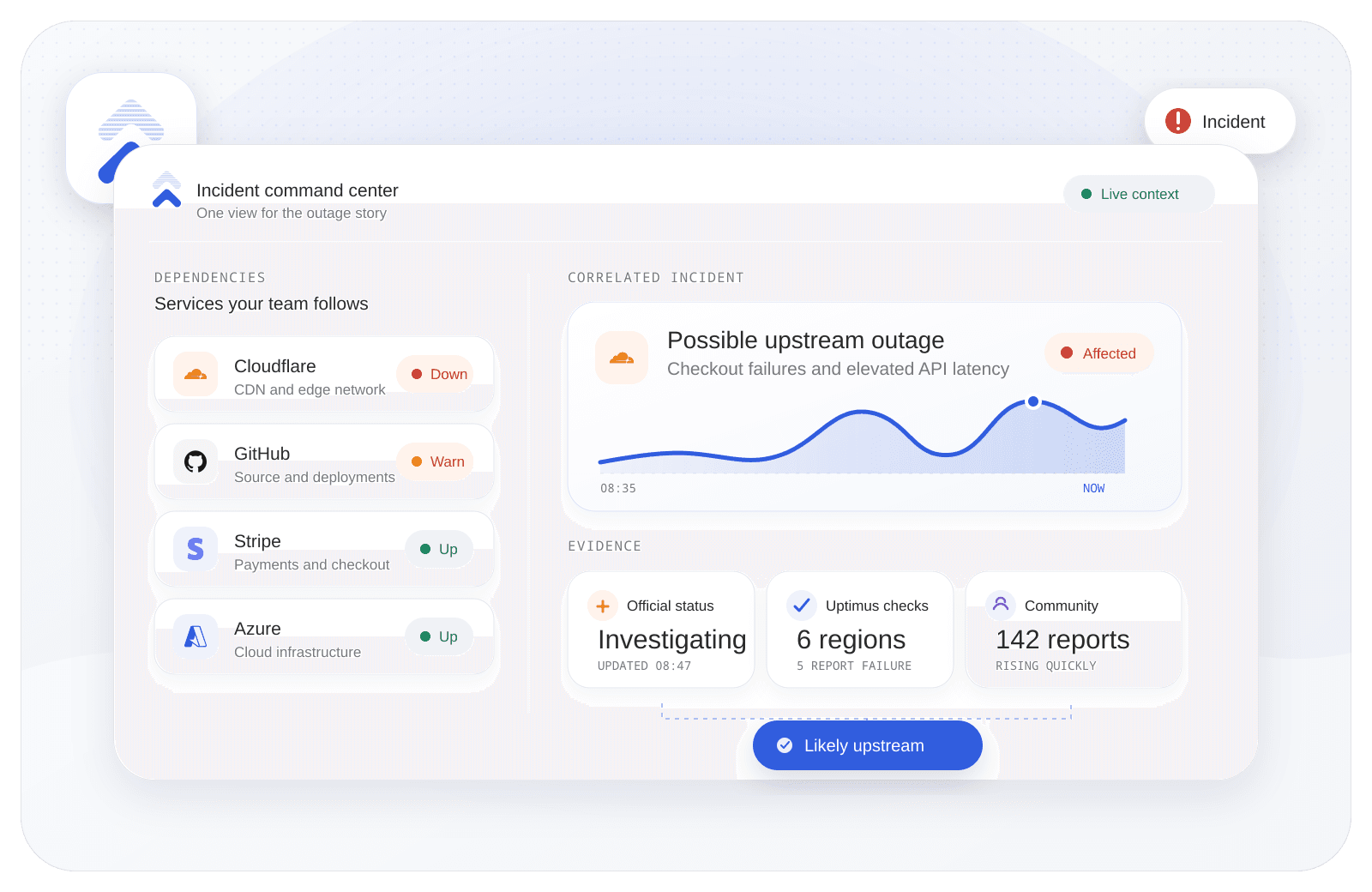
    Uptimus gives IT teams one live view of provider incidents, website and API checks, community reports, and notification history—so every answer starts with evidence.
    Start monitoring free See the IT workflow
    Uptimus incident command center correlating provider, regional, and community signals

    When the first ticket arrives

    Less tab hopping. More useful answers.

    Give the team a repeatable way to move from “something is broken” to the next sensible action.

    Triage with context

    See official provider incidents beside your own website and API checks.

    Route one useful alert

    Give the right team the service, status, and timeline—not another vague ping.

    Answer from one timeline

    Keep support and stakeholders aligned as an incident moves toward recovery.

    The IT workflow

    From scattered signals to one incident story.

    Follow the dependency, confirm what is affected, and route a clear answer without rebuilding the context at every handoff.

    01Follow the stack

    Bring every outside dependency into one view.

    Follow the cloud, payments, communications, productivity, and SaaS services the business relies on—without maintaining a folder of status-page tabs.
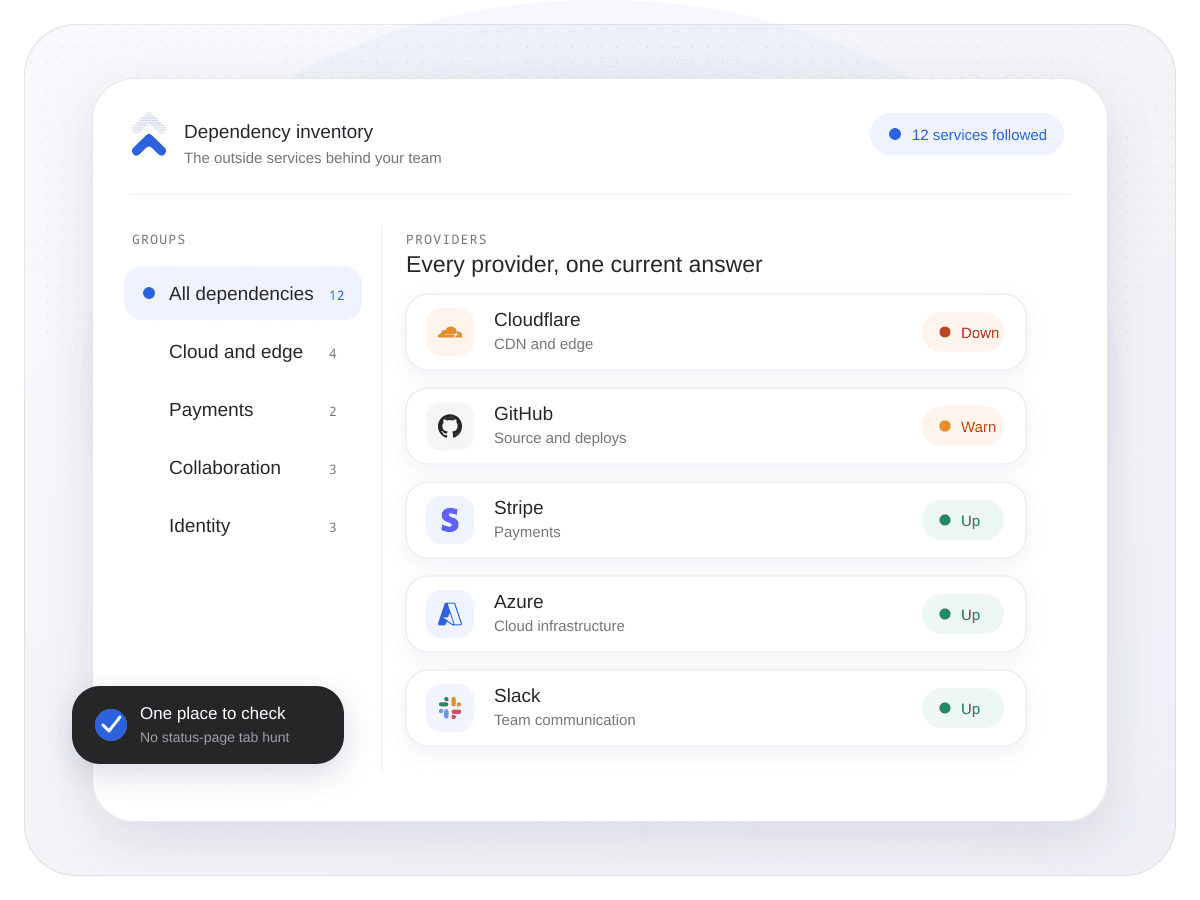
    • Connect official provider status pages.
    • Group the services each team actually depends on.
    • Keep planned maintenance beside active incidents.
    Follow the stack Uptimus
    Uptimus dependency inventory grouping cloud, payment, identity, and collaboration providers
    02Confirm the signal

    Know when the problem is upstream—not just loud.

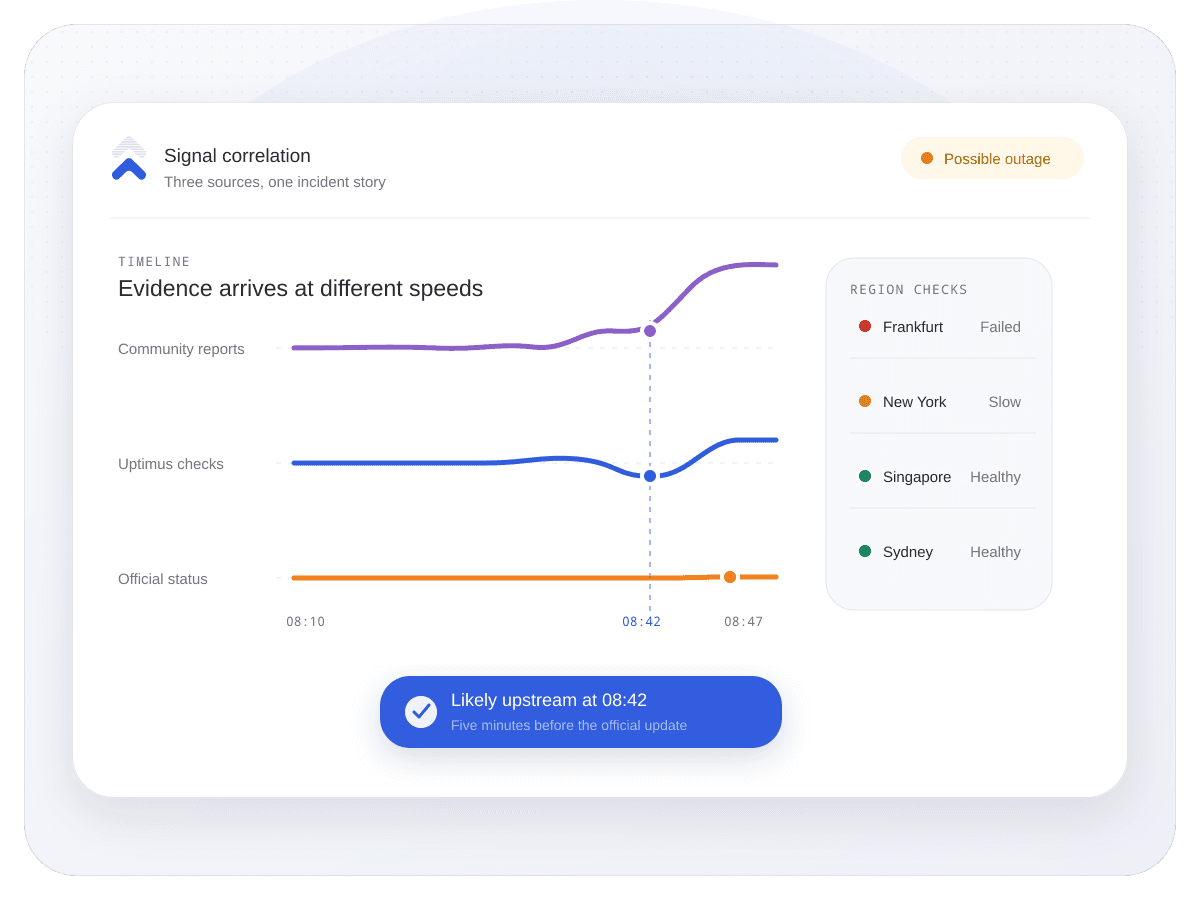
    Compare official updates with your own uptime checks and community reports. The team gets evidence early, while there is still time to investigate calmly.

    One incident, three conversations

    Everyone gets the answer they actually need.

    Share one source of truth without forcing the whole business into the same operational view.

    Service desk

    Yes, the provider has an active incident.

    Reply with a confirmed cause and the latest status.
    IT operations

    The upstream service is down; our check is affected too.

    Investigate from a shared timeline instead of separate tabs.
    Stakeholders

    The issue is known, owned, and being monitored.

    Follow one clear update without joining the incident channel.
    Notification destinations Connected
    Uptimus
    EmailConnected
    SlackConnected
    DiscordConnected
    TelegramConnected

    Meet the team where it works

    Send context to the channel already open.

    Deliver useful incident updates to email, Slack, Discord, or Telegram while Uptimus keeps the complete provider timeline in one place.

    • Email
    • Slack
    • Discord
    • Telegram

    When the answer travels further

    Share the update without forwarding the incident thread.

    Publish incident and maintenance updates on a branded status page so customers and internal stakeholders always know where to look.

    Explore status pages
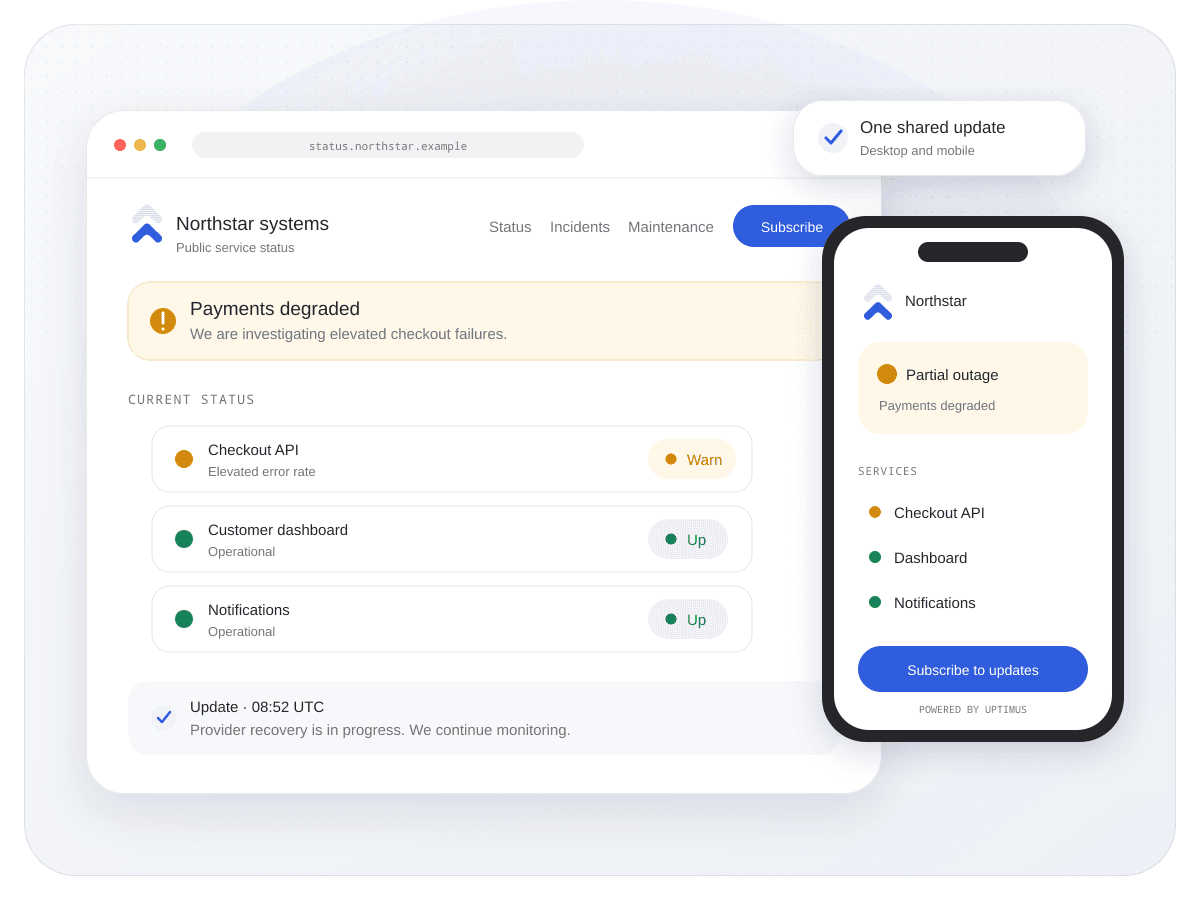
    Uptimus branded status page displayed on desktop and mobile

    Practical questions

    Before you connect the first provider, straight answers.

    Do we need API keys for every provider?

    No. Uptimus follows the public official status pages of supported providers. Your own website and API checks are configured separately, only for the endpoints you choose.

    Can we monitor our own websites and APIs as well?

    Yes. Your own uptime checks can sit beside third-party provider incidents, helping the team see whether an upstream event is affecting the service customers actually use.

    Where can IT alerts be delivered?

    Uptimus supports email, Slack, Discord, and Telegram notifications. Availability can depend on the workspace plan and the notification settings you enable.

    Does Uptimus track planned maintenance too?

    Yes. Provider maintenance, active disruptions, monitoring states, and recovery updates remain distinct so a planned change does not look like an unexpected outage.
    Can we share incident updates outside the IT team?

    Give IT the first clear answer. Keep everyone else in step.

    Start monitoring free View all use cases
    Uptimus

    Service monitoring, provider intelligence, and customer incident communication in one place.

    View system status

    Product

    Use casesFeaturesComparePricing

    Monitoring

    Status pagesCloud monitoringWebsite monitoringStatus aggregationPing monitoringIncidents

    Resources

    BlogLive statuses

    Company

    SupportPrivacyTerms
    © 2026 Uptimus
    Monitor first. Communicate clearly.
    • Spot rising community reports before an official update.
    • Check whether your own endpoint is affected.
    • Follow recovery without rebuilding the incident story.
    Confirm the signal Uptimus
    Uptimus signal correlation timeline comparing community reports, regional checks, and official status
    03Communicate clearly

    Send the answer, not the alert storm.

    Route incident context through the channels your team already uses, then keep everyone aligned when the provider changes state or the service recovers.
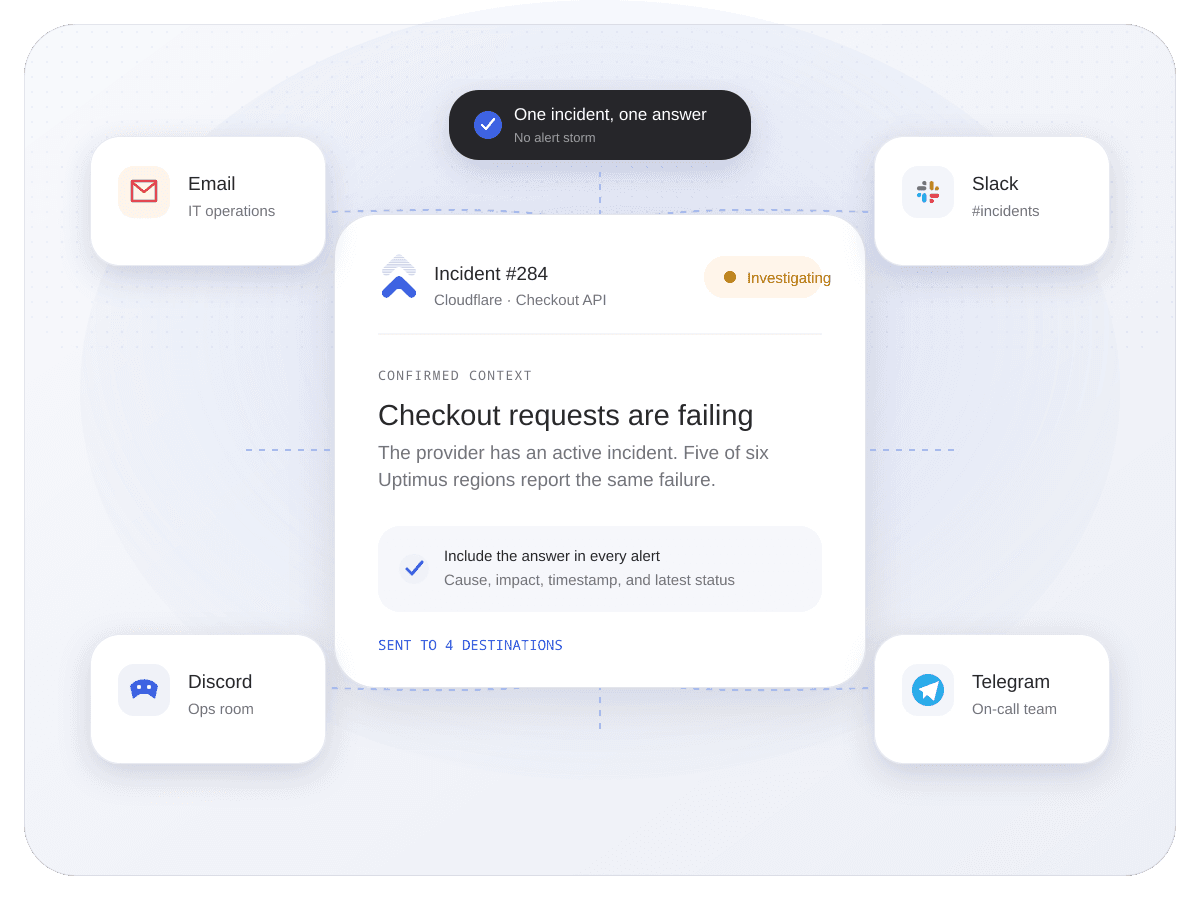
    • Notify by email, Slack, Discord, or Telegram.
    • Keep down, maintenance, and recovery states distinct.
    • Share a status page when customers need the same answer.
    Communicate clearly Uptimus
    One Uptimus incident routed with consistent context to email, Slack, Discord, and Telegram

    Yes. A branded status page gives customers and internal stakeholders a stable place to follow published incidents, maintenance, and recovery updates.